In our last AI edition the questions were about recognition: detectors, artist names in prompts, and attribution. On 4 November, Suno opened its Create page to MIDI files, so a song can start from exact notes and timing rather than from a text prompt or an uploaded recording. A day earlier, YouTube opened the music generator inside its Replace song tool to creators in most countries outside the European Economic Area, The Verge reported on 3 November, quoting YouTube's own availability line.
Both put generated audio into a working session instead of leaving it in a blank prompt box.
Suno: start a song from notes, not just text
Suno's 4 November post explains the new starting point simply: drag and drop a .mid or .midi file onto the Create page, or choose MIDI from the + menu. Then describe, in natural language, how closely the model should follow the file.
A MIDI file holds notes, rhythm and expression, but no sound. Suno notes that a file can carry up to 16 channels of pitch and timing data, so the same part can be rendered as a guitar line or a trumpet line depending on the instruction. That is the distinction it draws with Remix or Cover, which start from an uploaded WAV or MP3 and keep some of the sound of that recording. MIDI, Suno writes, "is conveying exact note and timing information, from which you can get very precise control over your songs."
You decide the tightness of the fit. Ask the model to play the notes exactly as written, or to take a top-line motif and develop it, or replay it on new instruments. Example prompts include "Arrange this MIDI for a full orchestra" and "Transform this MIDI into a string quartet. Use the notes and chord progressions exactly as they appear in the MIDI file."
Suno also points to exporting a work-in-progress score, letting students audition a composition, and digging MIDI out of old sessions. Even well-programmed MIDI cannot capture every articulation, and rendering it through large sample libraries is slow and expensive. The pitch is that Suno can do that rendering step from the file you already export from a DAW or a notation program.
Practical takeaway: if you write in a piano roll or a score editor, you can now bring the notes themselves into Suno without first bouncing audio. Say in the prompt whether the model should follow the file exactly or only take a motif from it.
YouTube: generated instrumentals to clear a claim
YouTube's change sits at the other end of a session: not writing a song, but getting a Content ID claim off a video. Replace song itself is not new. YouTube Studio has long let creators swap claimed audio for a track from the YouTube Audio Library. What changed is the Create button inside that tool.
The Verge reported on 3 November that the generator, introduced in the United States earlier this year, is now available to "creators in most countries outside of the European Economic Area," in YouTube's words. YouTube's Help Center confirms the same geographic limit and describes the option as swapping claimed audio for "an instrumental track generated by AI."
PPC Land, citing a 3 November TeamYouTube post, reports that clicking Create produces four unique, royalty-free instrumental tracks, each three minutes long. The Help Center adds that you can download those tracks as MP3 files and hover over a title to see licensing information. There is no prompt box: "As of now, there is no option to use your own prompt to generate a track." Refresh and click Create again for a new set. The FAQ, as quoted by PPC Land, says the tool "only generates instrumental background music."
Once a track is added, it behaves like an Audio Library clip on the timeline. By default YouTube removes only the music from the original soundtrack across the whole claim and leaves speech in place. The claim comes off "once all claimed audio is fully replaced."
The constraints matter as much as the button:
- Geography. Creators in the European Economic Area are outside the rollout. YouTube has not published a country list or an explanation. Trim, erase, and Audio Library swap remain.
- YouTube only. The TeamYouTube post, as quoted by PPC Land, states that "Music generated by this feature is intended solely for use in videos and other content that you create on YouTube."
- No undo, and desktop first. Since June 2025, edits saved in the YouTube Studio Editor cannot be reverted with "Revert to original." The Help Center advises downloading the video, or using Google Takeout, before you save, and documents Replace song for Studio on the web rather than the mobile app. Channels outside the YouTube Partner Program "may not be able to save changes" if a video has over 100,000 views.
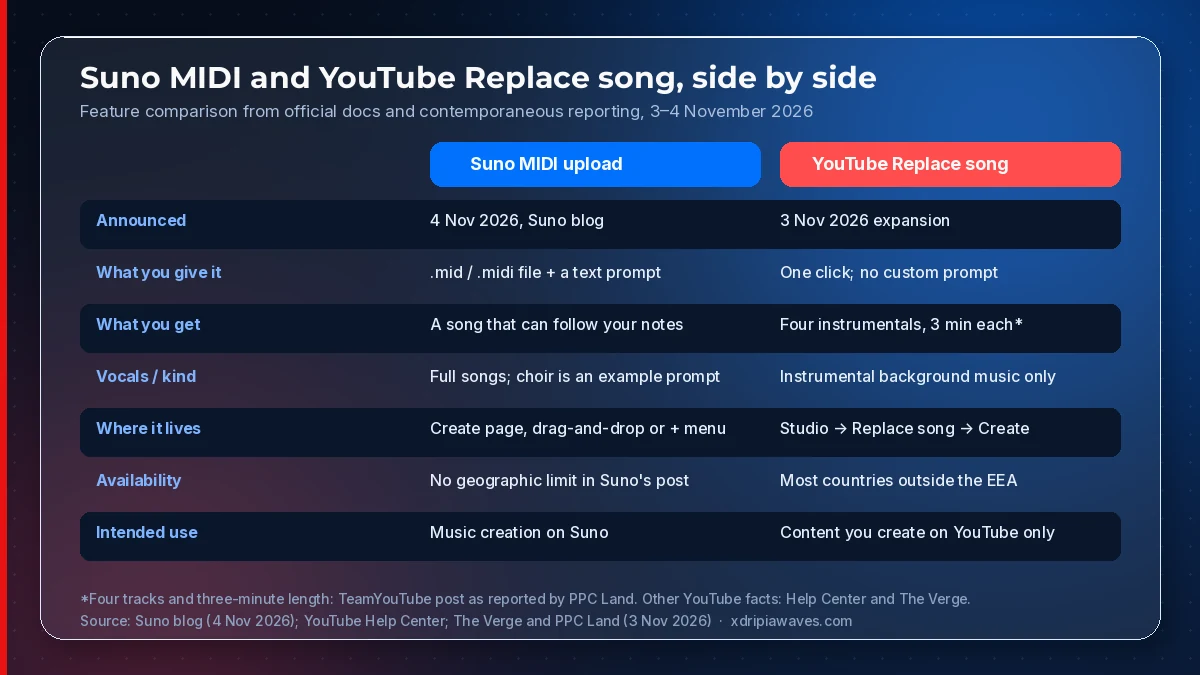
How the two features compare, November 2026. Source: Suno (4 Nov 2026); YouTube Help Center; The Verge and PPC Land reporting of YouTube's 3 November announcement.
Two directions in one week
Suno's MIDI upload preserves a composition you already wrote and asks a model to render or develop it. YouTube's generator writes a stand-in so a rights holder's claim can drop, without asking you what the stand-in should sound like. One starts from your notes. The other starts from a claim notice.
For producers, the MIDI path treats a piano-roll export as a first-class input. For anyone who publishes video with music underneath, the YouTube path is a claim-repair tool with a narrow licence, not a new music library for other platforms. Neither announcement settles the questions we covered on 5 November; they show where generated audio is being bolted onto existing workflows.
Practical takeaways
- If you write in a DAW or a notation app, export a
.midfile and try Suno's exact-notes prompt before you bounce audio. Say whether the model should follow the file or only take a motif from it. - If a YouTube video picks up an audio claim and you are outside the EEA, Replace song's Create button is now an option alongside the Audio Library. Download the original video first; the edit cannot be undone after you save.
- Do not treat a downloaded Replace song MP3 as a general-purpose soundtrack. YouTube limits that music to content you create on YouTube.
Sources
- Suno: Start Songs with MIDI (4 November 2026)
- YouTube Help: Remove copyright-claimed content
- The Verge on the Replace song expansion (3 November 2026)
- PPC Land on the TeamYouTube announcement