In our last Graphics column the news was about where design work happens and how it is shown to buyers. This week three projects took clear positions on generative AI inside graphics software. Canva released its own model for editing finished layouts, Apple announced prompt-based fill for Pixelmator Pro, and the Inkscape developers moved towards a policy that rejects any AI-generated contribution to the project.
For musicians and labels who produce covers, flyers and social assets, these are three different answers to the same question: should the tool change the image for you, or should it stay out of the way?
Canva Brush: a model for the edit, not the first draft
On October 29 Canva introduced Canva Brush, a vision-language model built by Canva Research, which the company describes as a 160-person AI lab. Brush reads an existing design, works out how it is structured and applies the requested change, from one line of copy to every page of a deck.
What Canva says it does
- Agentic loop: Brush writes and runs code to adjust design elements, then inspects the page to decide its next step.
- Editable output: text, images, colours and layout stay as normal Canva elements that can be changed by hand.
- Speed and cost: up to 69% faster on general editing tasks and 46% lower cost per edit task than Canva's previous design agent.
- Training: it started from an open-weights model and was post-trained on design and editing tasks, using anonymised insights from people who opted in to help improve Canva AI, plus reinforcement learning against a reward system set by Canva's own designers.
The speed and quality figures come from Canva's internal testing and have not been independently checked. Brush is available now for Canva Pro subscribers in Canva AI, selected from a dropdown, with wider availability promised. Canva says Brand Kit support, attachment references and better handling of image-heavy layouts are still in progress.
The suggested uses are practical: restyling an existing design, changing a header across a multi-page file in one request, or turning a slide into an Instagram graphic. For a release campaign that needs the same artwork in a dozen formats, that last item is the relevant one.
Pixelmator Pro gets Generate Fill
On October 27 Apple announced an update to Apple Creator Studio, its subscription bundle of creative apps. The graphics item is Generate Fill in Pixelmator Pro.
How it works
According to Apple, a user circles an area of an image, or selects it with Free Selection, Quick Selection or Magnetic Selection, and describes the change. The tool matches the surrounding lighting, perspective and texture, and built-in Super Resolution upscales the generated area. Results can be merged into the existing layer or added as a new layer with a mask for further refinement.
Other parts of the update are relevant to visual work:
- Final Cut Pro round trip: an image on a video timeline can be opened in Pixelmator Pro and saved back to the project without reimporting.
- MotionVFX in Final Cut Pro: effects, transitions, templates and motion graphics are now built in.
- Freeform: editing images in Pixelmator Pro and generating editable shapes from text are scheduled for December.
What is not yet known
DPReview notes that Apple has not named the model behind Generate Fill, has not said whether processing is on-device or in the cloud, and has not said whether the one-time purchase version of Pixelmator Pro will receive the feature. The update is due on the App Store in November, with no exact date, as a free update for subscribers. Fstoppers lists US pricing of $12.99 per month or $129 per year for the bundle, and $49.99 for Pixelmator Pro as a one-time purchase.
Inkscape drafts a no-AI rule for contributors
The open-source vector editor took the opposite route. On October 24 a developer opened a merge request that adds an AI policy file to the Inkscape repository. Its policy line is short: "You may not submit to the project anything that comes out of a Generative AI system."
Scope and status
The text explains the reasons under social, technical, legal and environmental headings. It says contributors must understand and be able to explain any code they submit, and that the project wants its own people to keep agency over the codebase. The rule covers what is submitted to the project, such as code; it does not restrict what users draw with Inkscape.
The policy is not yet final. In the developer meeting minutes of October 28, the team is described as broadly in favour, with ratification to go through a vote of the Project Leadership Committee. The same meeting discussed tagging the Inkscape 1.5 alpha, which the minutes mention releasing around Halloween. The 1.5 release notes list a move to GTK 4, a new colour management system with CMYK, Lab and OkLch among the supported spaces, a refactored Fill and Stroke panel, and a new PDF engine, CapyPDF. At the time of writing we could not confirm that the alpha had been published.
Three approaches side by side
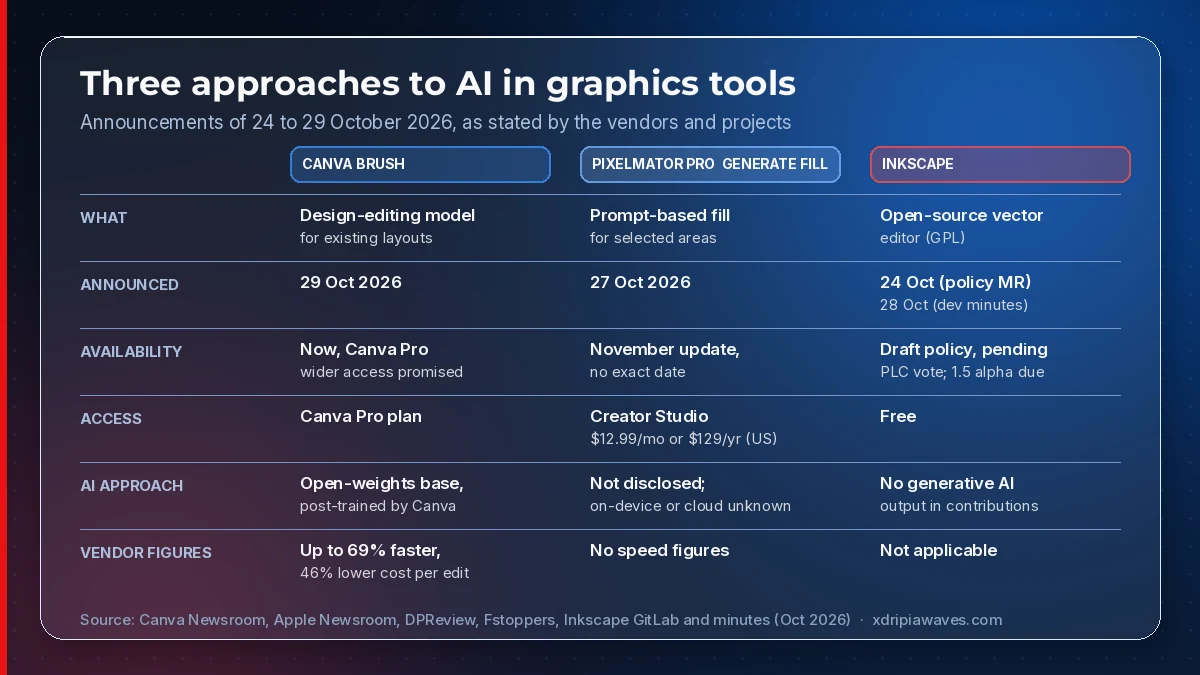
Source: Canva Newsroom (29 Oct), Apple Newsroom (27 Oct), DPReview, Fstoppers, Inkscape GitLab and developer minutes (24–28 Oct).
What to take from it
For anyone commissioning or making music visuals, the week leaves a few practical points:
- Reformatting is where the assistants aim first. Both Brush and Generate Fill are built to change existing work, so keep a clean master file and check every generated variant against it.
- Ask what runs where. Apple has not yet said where Generate Fill processes images; if unreleased artwork is involved, wait for that answer.
- Check disclosure rules. Etsy, covered in our last column, requires AI-generated art to be disclosed and asks for an unedited photo of physical products; know which of your images were generated before you list them.
- Open tools remain an option. Inkscape's stance concerns its own code, but artists who want a vector editor without generative features built in still have one, with a major release in preparation.